← MicroPython on Pi Pico and Projects
Project 1.7
Project 1.7: Reading Your Switches
Read your switches, and only print when one of them changes
This is for after your switch wiring from Project 1.6 is signed off.
Read a switch
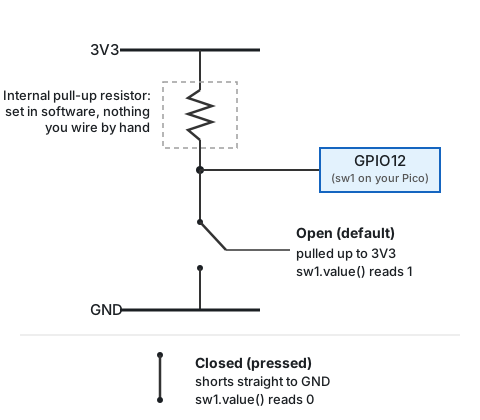
A switch wired this way works exactly like the push-button in Chapter 4: closed, it connects your GPIO pin straight to ground; open, it doesn’t connect to anything, so you need a pull-up to give it a known value.
from machine import Pin

sw1 = Pin(12, Pin.IN, Pin.PULL_UP)
sw2 = Pin(11, Pin.IN, Pin.PULL_UP)
sw3 = Pin(10, Pin.IN, Pin.PULL_UP)
This is from machine import Pin rather than the import machine you’ve used up to now, so it’s Pin(...) instead of machine.Pin(...). Same thing either way, just a shorter name for it; Project 1.8 covers why there’s more than one way to do this.
Click into the Shell, type sw1.value(), and press Enter. Off (away from the ON label), you’ll get 1: the pull-up is holding the pin high since nothing else is connected to it. Now flip switch 1 to ON, and run the exact same line again: press the up arrow to bring it back instead of retyping it, then Enter. This time you’ll get 0, the switch connecting the pin straight to ground. Flip it back off, up arrow, Enter, back to 1. Repeat with sw2.value() and sw3.value() to check all three switches are wired correctly before moving on.
Print only when something changes
A loop that prints every single time around, with no condition, would flood your Shell with thousands of identical lines a second. Printing only when something’s actually different means remembering what you printed last, which means a variable for each switch’s last known reading, started before the loop begins and updated every time you do print.
Save this as watchswitches.py and run it:
from machine import Pin
from time import sleep

sw1 = Pin(12, Pin.IN, Pin.PULL_UP)
sw2 = Pin(11, Pin.IN, Pin.PULL_UP)
sw3 = Pin(10, Pin.IN, Pin.PULL_UP)

last1 = None
last2 = None
last3 = None

while True:
    v1 = sw1.value()
    v2 = sw2.value()
    v3 = sw3.value()

    if v1 != last1 or v2 != last2 or v3 != last3:
        print(v1, v2, v3)

        if v1 == 0:
            word1 = "ON"
        else:
            word1 = "OFF"
        if v2 == 0:
            word2 = "ON"
        else:
            word2 = "OFF"
        if v3 == 0:
            word3 = "ON"
        else:
            word3 = "OFF"
        print(word1, word2, word3)

        last1 = v1
        last2 = v2
        last3 = v3

    sleep(0.05)
Flip switches one at a time and watch both lines print together, like 1 1 0 followed right below by OFF OFF ON. Line up the two rows and the inversion from the note above stops being something you take on faith: a 1 really does print as OFF, a 0 really does print as ON, every single time. Stop touching the switches and the Shell goes quiet, no matter how long the loop keeps running underneath.
Once your Shell stays quiet until you actually flip something, move on to Project 1.8, where you’ll use these same three switches to choose which program runs.