← MicroPython on Pi Pico and Projects
Project 1.5
Project 1.5: Fading an LED with PWM
Make an LED fade smoothly, not just switch on and off
This is for after Project 1.4 has you comfortable writing a script with a while True loop. Your Pico should already be connected and showing MicroPython, same as the last few days.
On, off, or something in between?
Every LED you’ve controlled so far has only ever been fully on or fully off, .value(1) or .value(0). A GPIO pin genuinely can’t do anything in between: it’s digital, so it only ever outputs one of two voltages.
Pulse-width modulation, or PWM, fakes something in between anyway. Instead of holding a pin steady on or off, PWM switches it on and off very fast, hundreds or thousands of times a second, and varies how much of each cycle it spends on versus off. Switched fast enough, your eye can’t follow the flicker: an LED that’s on 75% of the time and off 25% of the time just looks dimmer than one left on the whole time, not like it’s blinking.
If you’ve used The Water Analogy page, this is the same valve, just snapping open and shut faster than you could ever flip it by hand: averaged over time, a valve that’s open three-quarters of the time passes three-quarters as much water as one left fully open.
Set up PWM on one of your LEDs
Check your Project 1.1 Notes page for one of your wired LEDs’ pin numbers, then create a PWM object for it instead of a plain Pin:
import machine
import time

led = machine.PWM(machine.Pin(13))
led.freq(1000)
Use whichever pin number you actually wired. machine.PWM(...) wraps the Pin so it can be switched on and off far faster than any loop you could write yourself. freq(1000) sets it to switch 1000 times a second, fast enough that you’ll never see it flicker.
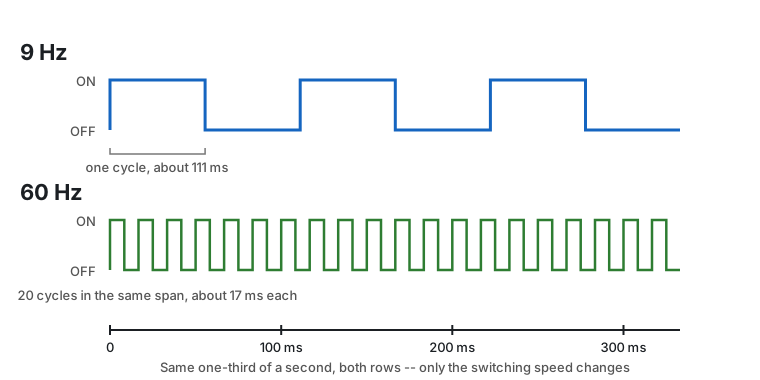
Same on/off split both times, just switched at a different speed. At 9 Hz each pulse lasts long enough to actually watch. 60 Hz, roughly where old TVs and fluorescent lights used to run, is already fast enough that most people stop seeing individual flickers. freq(1000) is faster still, so many cycles in the same slice of time that drawing them this way would just look like a solid line.
Duty cycle: how much of each cycle is “on”
The fraction of each cycle spent on is the duty cycle. duty_u16() sets it, as a number from 0 (always off) to 65535 (always on), the largest number that fits in 16 bits:
led.duty_u16(0)
led.duty_u16(32768)
led.duty_u16(65535)
Try each of these one at a time in the REPL and watch the LED’s brightness change.
Your eye doesn’t read duty cycle in a straight line
You might expect 32768, exactly half of 65535, to look half as bright as fully on. It probably didn’t. Brightness is one of the senses that doesn’t work on a straight line: a change near the dim end is easy to see, while the same size change near the bright end barely registers. For an LED on PWM, most of the visible difference happens below about 10,000; almost everything above that already looks close to fully on.
Keep that in mind for the breathing effect below. A value doesn’t have to be close to 65535 to look bright.
Make it breathe
You’ve just set the duty cycle by hand, three times, in the REPL. A real “breathing” effect means changing it automatically and continuously: brighter, brighter, brighter, then dimmer, dimmer, dimmer, forever, with no typing after you click Run.
Once leds.py has all four functions working, move on to Project 1.6, where you’ll wire a set of switches onto the same breadboard.