Problem 1
Mario (less comfortable)
Print a half-pyramid of hash-mark blocks, validating a height between 1 and 8.
Background
Recall Mario, the classic 1985 video game wherein the player, as Mario, runs and jumps his way through a mushroom kingdom, collecting coins and avoiding obstacles, all in an effort to save a princess.
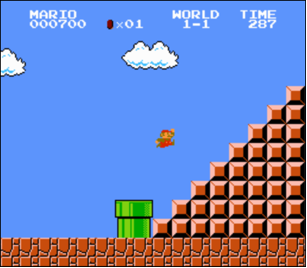
In this problem, you don’t need to write any code for the game itself.
Instead, let’s write some code to print a half-pyramid of blocks like
you might see in the game itself, using hashes (#) for blocks, per the
below, where the top-left of the game’s screen is deemed to be at the
top-left of your terminal window.
#
##
###
####
#####
######
#######
########
This particular half-pyramid is eight rows tall and eight columns wide.
Demo
Getting Started
Log into cs50.dev, click on your terminal window, and run:
cd
mkdir mario
cd mario
code mario.py
That creates a new folder called mario, moves into it, and opens a
new, empty file called mario.py for you to edit.
Specification
Implement a program, in mario.py, that recreates this half-pyramid
using hashes for blocks, wherein the half-pyramid’s height should be a
non-negative integer between 1 and 8, inclusive.
- Prompt the user for the pyramid’s height with
input(). - Convert what the user typed to an integer with
int(), and validate it yourself: if it isn’t a valid integer, or is outside the range 1 through 8, print an error (or simply say nothing) and prompt again. Keep prompting until the user gives you a valid height. Converting a non-numeric string like"foo"withint()raises aValueErrorif you don’t guard against it, so think about how you’ll catch or avoid that before it crashes your program. - Once you have a valid height, generate (with the help of
printand one or more loops) the half-pyramid itself. - Take care to align the bottom-left corner of your half-pyramid with the left-hand edge of your terminal window, and make sure there’s no trailing whitespace at the end of any row.
How to Test
Confirm that your program behaves as follows.
- If the user’s input is
-1, your program should reject it and prompt the user again for a valid height. - If the user’s input is
0, your program should likewise reject it. -
If the user’s input is
1, your program should output:# -
If the user’s input is
2, your program should output:# ## - If the user’s input is
8, your program should output an eight-row pyramid like the one shown above. - If the user’s input is
9(or anything greater than8), your program should reject it and prompt again; only after that should it accept a valid height like8. - If the user’s input is
foo(not a number at all), your program should reject it without crashing, and prompt again. - If the user presses Enter without typing anything, your program should treat that the same as any other invalid input: reject it and prompt again.
Style and Submission
Run these one at a time, from inside your mario folder.
Check your style:
style50 mario.pyCheck your correctness:
check50 cs50/problems/2024/x/sentimental/mario/lessSubmit your work:
submit50 cs50/problems/2024/x/sentimental/mario/lessGlossary
- algorithm — A finite sequence of steps that solves a problem or completes a task. Can be written in English, pseudocode, or code.
- loop — A statement that runs one or more statements, often repeatedly. (AP calls this iteration.)
- conditional statement — A statement that controls the flow of execution depending on some condition. Informally, this is usually an if statement, which might include an elif and an else. (AP calls this selection.)
- boolean expression — An expression whose value is either True or False.
Version history
- Loading commit history…