Problem 7
Battery Gauge
Read a battery's voltage and report whether it's low, good, or a plain percentage, validating input with try/except.
Background
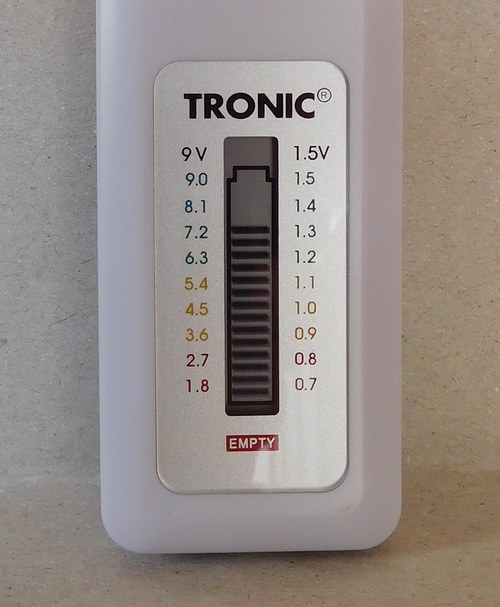
A fresh AA alkaline battery is rated at 1.5V, but “rated” isn’t the same as “reads.” Straight off the shelf, a fresh cell often measures a little higher, sometimes 1.6V or more. As it discharges under use, the voltage sags, and by around 1.2V most devices start acting flaky: dimmer lights, sluggish motors, a wall clock running slow. Below that, the cell still has some chemistry left in it, but not enough to trust.
This problem asks you to write a program that takes a voltage reading and a battery’s nominal (rated) voltage, and reports back one of three things: that the battery is low, that it’s a plain percentage of nominal, or that it’s reading unusually strong. Structurally, this is close to a classic problem about a fuel tank and a fraction: parse two numbers, do some division, and turn the result into a human-readable reading. If you’ve seen that problem before, or asked an AI to solve it for you, the shape will look familiar, but read the specification below closely anyway. A couple of the rules here work differently, on purpose.
This shows what your program’s output should look like for valid input; it doesn’t validate or reject anything the way your program needs to. See the specification below for the actual rules.
Getting Started
Log into cs50.dev, click on your terminal window, and run:
cd
mkdir battery
cd battery
code battery.py
That creates a new folder called battery, moves into it, and opens a
new, empty file called battery.py for you to edit.
Starter Code
Paste this into battery.py to start from. gauge_reading is stubbed
out with pass and two >>> examples, the same doctest format you’ve
already seen in Think Python; run python3 -m doctest battery.py from
inside your battery folder to check them. They’ll fail until you
replace pass with real code, and you should add one more example of
your own, for the LOW case. If every example passes, the command
prints nothing at all; silence means you’re good. A failure prints a
diff of what it expected versus what your code returned.
Notice the first example passes in 89.6, not a whole number.
gauge_reading should round to the nearest integer itself rather than
trust its caller to have already done it; that way it gives a correct
reading no matter where in your program the rounding ends up
happening.
main is left as a comment on purpose. The retry loop is the actual
point of this problem, and a docstring can’t check it the way it can
check gauge_reading (see the note further down about why), so
there’s no starter shape to hand you there beyond the reminder of what
it needs to do.
# Student Initials:
"""
Battery Gauge

Slug: porttack/cs50/problems/py/battery
Doctests: python3 -m doctest battery.py
"""


def main():
    # Prompt, then validate inside a try/except loop per the
    # specification below. Once you have a valid reading, print what
    # gauge_reading() returns.
    pass


def gauge_reading(percent):
    """
    Returns the gauge reading for percent, a percentage of nominal
    voltage. Rounds percent to the nearest integer itself, so it's
    fine to pass in a number that isn't rounded yet.

    >>> gauge_reading(89.6)
    '90%'
    >>> gauge_reading(105)
    'GOOD (105%)'
    """
    pass


if __name__ == "__main__":
    main()
Specification
Implement a program, battery.py, that reads a battery’s voltage and
reports its charge.
- Prompt the user for input with
input("Voltage: "). The user will enter two numbers separated by a slash,X/Y, whereXis the measured voltage andYis the battery’s nominal (rated) voltage. Neither is guaranteed to be a whole number:1.35/1.5is valid input, not just3/4. - Compute the reading as a percentage of nominal,
X / Y * 100, rounded to the nearest integer. - If the percentage is 80 or less, print
LOW (N%), whereNis the percentage. For example,LOW (50%). - If the percentage is 100 or more, print
GOOD (N%). Unlike a fuel tank, a battery can genuinely read above its nominal voltage and still be a valid reading, so don’t reject it. For example,GOOD (104%). - Otherwise (the percentage is between 81 and 99, inclusive), print
just
N%, with no label. For example,73%. Xmust not be negative. A negative voltage isn’t a real reading; prompt again.Ymust be a positive number. If it’s zero or negative, prompt again.- If the user’s input isn’t in the
X/Yformat, orXorYisn’t a number at all, prompt again. - In every “prompt again” case above, don’t print an error message,
just silently ask again with the same
"Voltage: "prompt.
Usage
Your program should behave like the demo below.
$ python battery.py
Voltage: -1/1.5
Voltage: abc/1.5
Voltage: 1.35/1.5
90%

$ python battery.py
Voltage: 1.2/1.5
LOW (80%)

$ python battery.py
Voltage: 2.25/1.5
GOOD (150%)
Hints
If exceptions still feel unfamiliar, CS50’s own lecture on the topic is a solid general reference: CS50P - Lecture 3 - Exceptions. It’s the same lecture that introduces the fuel tank problem mentioned above, so it covers try/except and raise from the ground up. The hints below are specific to this problem, not a substitute for it, and they build on each other in order: if you’re not sure where to start, work through them top to bottom rather than jumping to the last one.
Need a hint?
-
Split the reprompt loop from the reading-to-label conversion. A
main()that loops withtry/exceptuntil it has a validxandy, then hands them off to a second function that just does the math and returns a string, is much easier to get right than one giant function that does both at once.Here’s the skeleton of that loop, with none of the battery-specific logic filled in yet, just the shape:
while True: try: # Read the input, split it, convert both pieces to float, # and check any rules that aren't exceptions on their own # (see the third and fourth hints below). break # Only reached if nothing above raised or continued. except: continuebreakimmediately exits thewhileloop, so it belongs right after the last check that could still reject the input, once you’re confidentxandyare both good.continuejumps straight back to the top of the loop and re-prompts, skipping over anything else left in thetryblock, including thatbreak.A bare
except:, with no exception type named, catches anything that goes wrong in thetryblock, which is exactly what you want here: don’t spend time trying to guess or look up every exception type that could get raised. Naming the specific ones you expect,except (ValueError, ZeroDivisionError):, is better habit for bigger programs, since a bareexcept:will also silently swallow an unrelated mistake elsewhere in your code, not just the input errors you meant to catch. For a program this size, that risk is low, and it’s not something check50 checks for either way. Get it working first with a bareexcept:if that’s what’s blocking you, then narrow it later if you want the practice. -
"1.35/1.5".split("/")gives you a list of two strings,["1.35", "1.5"]. Python lets you assign both pieces to two variables in one line, called unpacking:>>> x, y = "1.35/1.5".split("/") >>> x '1.35' >>> y '1.5'If the split doesn’t produce exactly two pieces (say, someone types
1.35with no slash at all, or1/2/3with two slashes), that unpacking line itself raisesValueError, before you ever callfloat(). You don’t need to count the pieces yourself; theexceptblock above already catches it. float()works likeint(), but accepts decimals:float("1.35")gives you1.35, andfloat("abc")raisesValueError, same asint("abc")would.- Dividing by zero raises
ZeroDivisionErroron its own; you don’t have to check for it. A negative number dividing another number, though, raises nothing at all, since there’s nothing mathematically wrong with it. That’s a rule Python doesn’t know about, so you have to enforce it yourself, with a plainif, not an exception. - If you’d rather have that rule go through the same
exceptblock instead of a separateif, you can triggerValueErroryourself from inside thetryblock:raise ValueError(with nothing after it, no message needed). Raising it there sends control straight to the matchingexceptbelow, exactly as if Python had raised it for you. This is optional; a plainif condition: continueworks just as well, and reads more clearly to a lot of people.
To Get Full Credit
It’s more important that you submit a working solution than that you do everything below. Submit early, then keep improving and resubmit as many times as you like.
- Fill in
gauge_readingwith real code, and add one more>>>example of your own to its docstring, for theLOWcase. It’s a pure function, no input, no exceptions, so it doctests cleanly. Don’t try to do the same for the retry loop inmain: a docstring can’t express “type this, then that raises an exception,” so it doesn’t doctest well at all. We’ll cover testing code that raises exceptions later on, with a different tool. - At the end of the program, add a comment describing any challenges you ran into or what you’d improve if you did this again. A sentence or two is fine.
Style and Submission
Run these one at a time, from inside your battery folder.
Check your style:
style50 battery.pyCheck your correctness:
check50 porttack/cs50/problems/py/batterySubmit your work:
submit50 porttack/cs50/problems/py/batteryGlossary
- exception — An error Python raises while a program is running,
as opposed to one caught before the program starts (like a syntax
error).
ValueErrorandZeroDivisionErrorare both exceptions. - try/except — A block that attempts some code (
try) and, if it raises an exception, runs different code instead of crashing (except), catching one or more listed exception types. - raise — A statement that triggers an exception yourself, on
purpose. Lets you route a rule Python doesn’t enforce on its own
(like “this number can’t be negative”) through the same
exceptblock that catches Python’s built-in exceptions. - ZeroDivisionError — The exception Python raises when code divides by zero.
- ValueError — The exception Python raises when a function gets an
argument of the right type but an inappropriate value, such as
int("abc")orfloat("abc").
Version history
- Loading commit history…